DLS-LEAD

The AI-ready design system infrastructure for SaaS teams

DLS-Lead is a design system your AI tools can actually read. 100+ production-grade components in Figma and React, connected by a 4-layer DTCG-compliant token architecture that works for human designers, developers, and AI coding agents.

★ 100+ components

★ 4-layer tokens

★ Figma + React + Storybook

★ DTCG-compliant

★ AI agent-readable

⛤ Figma UI Kit

100+ components with auto-layout, variants, and component properties. Each with all interactive states.

⛤ React components in Storybook ↗

Browse interactive stories in Storybook, test props and states live, grab code from GitHub.

⛤ Light and dark themes

Toggle between light and dark and every component adapts automatically through token references.

⛤ 4-layer token architecture

DTCG-compliant tokens organized in 4 cascading layers. Change a primitive once. Every component updates automatically. All exportable as JSON.

⛤ AI-agent readable spec ↗

Structured token definitions and component specs that AI coding agents can read. Your AI stops hallucinating colors and spacing. It looks them up instead.

⛤ Full documentation↗

Token references across all layers, component API docs, usage guidelines, architectural explanations.

The market offers two imperfect options: UI Kits, Enterprise libraries, AI coding agents

❌ UI Kits are fast to start, but hard to scale. Fine for prototypes, painful for production.

❌ Enterprise UI component libraries are powerful, but heavy. Require months of customization to feel like your product.

❌ AI coding agents generate UI fast, but without tokens to reference, every AI-generated component hallucinates. Visual debt accumulating at machine speed.

So why do product teams choose DLS-Lead?

DLS-Lead is system infrastructure. Not a UI kit and not a heavy framework. It provides a 4-layer token architecture that enables safer theming, predictable overrides, scalable UI, and AI-readable token definitions.

When a developer builds a component, they reference the token system. When an AI agent builds a component, it reads the same token system. The design decision was made once by a human. Everything else looks it up.

• Primitives
• Semantics
• State
• Component tokens
• Figma + React + Storybook

A design system your whole team can use

From raw values to components, every layer of the system is documented and ready to use in both Figma and React

Try free version ►
Token preview
// 4-layer architecture: Primitives → Semantics → State → Component
{
  "color": {
     "primary": {"500": { "$value": "#6B4C9A", "$type": "color" }
      },
     "neutral": {"900": { "$value": "#0D0F12", "$type": "color" }
      }
   }
}

100+ components in every state. All tokenized

Each component is built in Figma with variants and auto-layout, coded in React, documented with usage guidelines, and wired to the token system from primitives through to component-level tokens.

CORE UI

button | button group | input | fields | checkbox | radiobutton | switcher |slider | chips | badge| kbd.

FEEDBACK AND OVERLAY

alert | alert dialog | dialog | tooltips | spinner | skeleton | empty | progress bar

NAVIGATION

accordion | tabs | breadcrumbs | pagination | context menu | scroll | separator

DATA AND CONTENT

table | list | item | chart | calendar| carousel | avatar| comment

LAYOUT

sidebar | top bar | forms

UTILITY

assets | parts | resizable

4-layer cascading architecture

Each layer references the one below it. Change a primitive, and it flows through semantics, state, and component layers automatically.

Layer 1:

Primitives

→ Change your brand foundation instantly

Raw values like colors, spacing, and typography scales live here. Update a primitive once and every semantic style and component updates automatically. This is where your brand identity lives.

The base palette: Neutral (0–900) |Primary (50–900)|Semantic scales for Info, Success, Warning, and Danger.

Additional palettes: Purple |Violet |Pink |Blue |Teal |Yellow |Green | Gold | Cinnamon | Orange. 

Opacity tokens: Light|Dark overlay use cases.

Primitives swatches
Semantics colors table
Layer 2:

Semantics

→ Safer theming without breaking components

Meaning-based tokens like background.surface or text.primary reference primitives. Switch themes by remapping this layer. Components don't change. When an AI agent reads var(--color-text-primary), it gets the right value for whichever theme is active.

Layer 3:

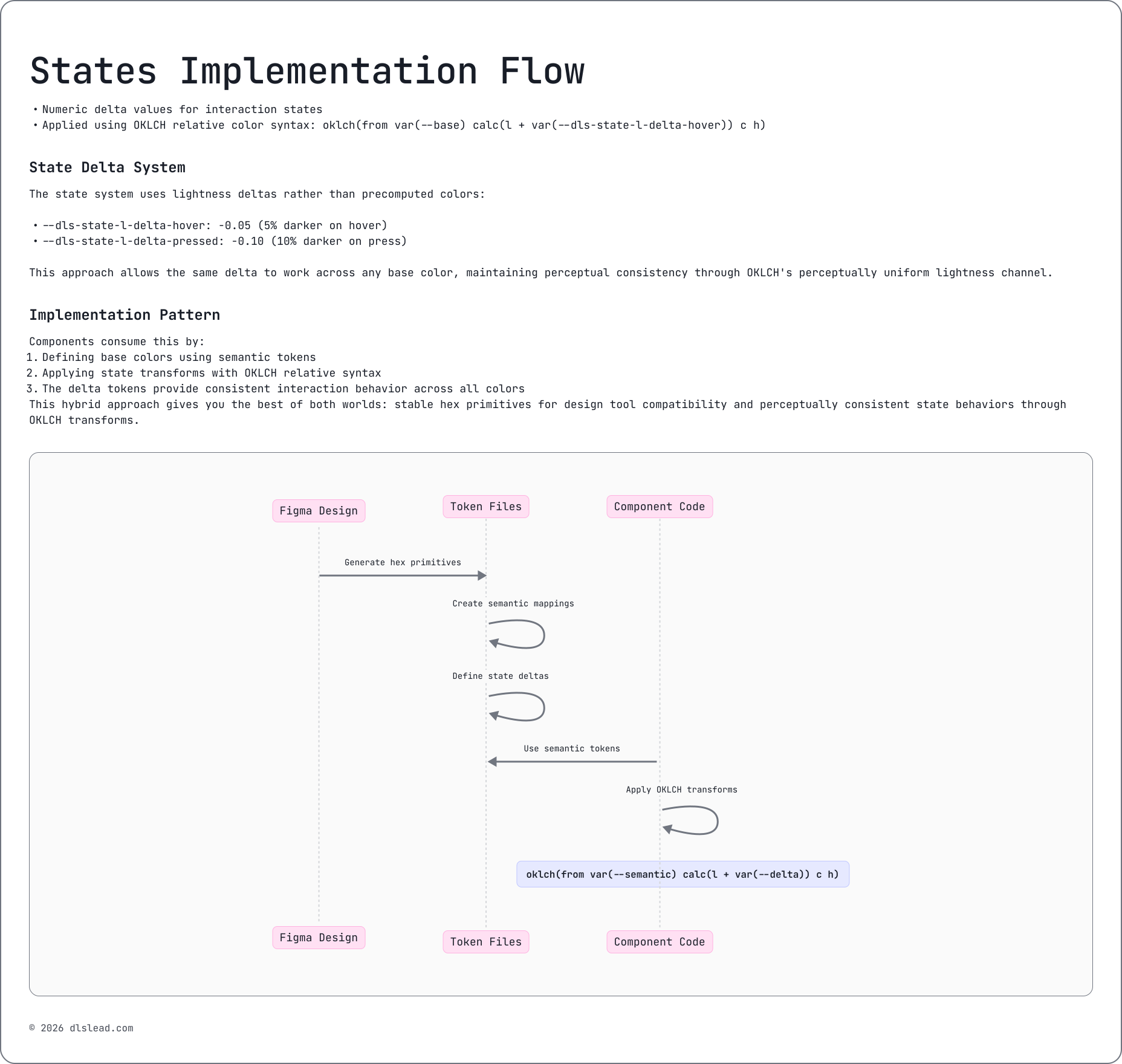
State

→ Consistent interaction across the whole product

Hover, active, disabled, and focus states are defined centrally. Every component inherits the same interaction logic automatically. No more "the button hover is different on the settings page."

States Implementation Flow
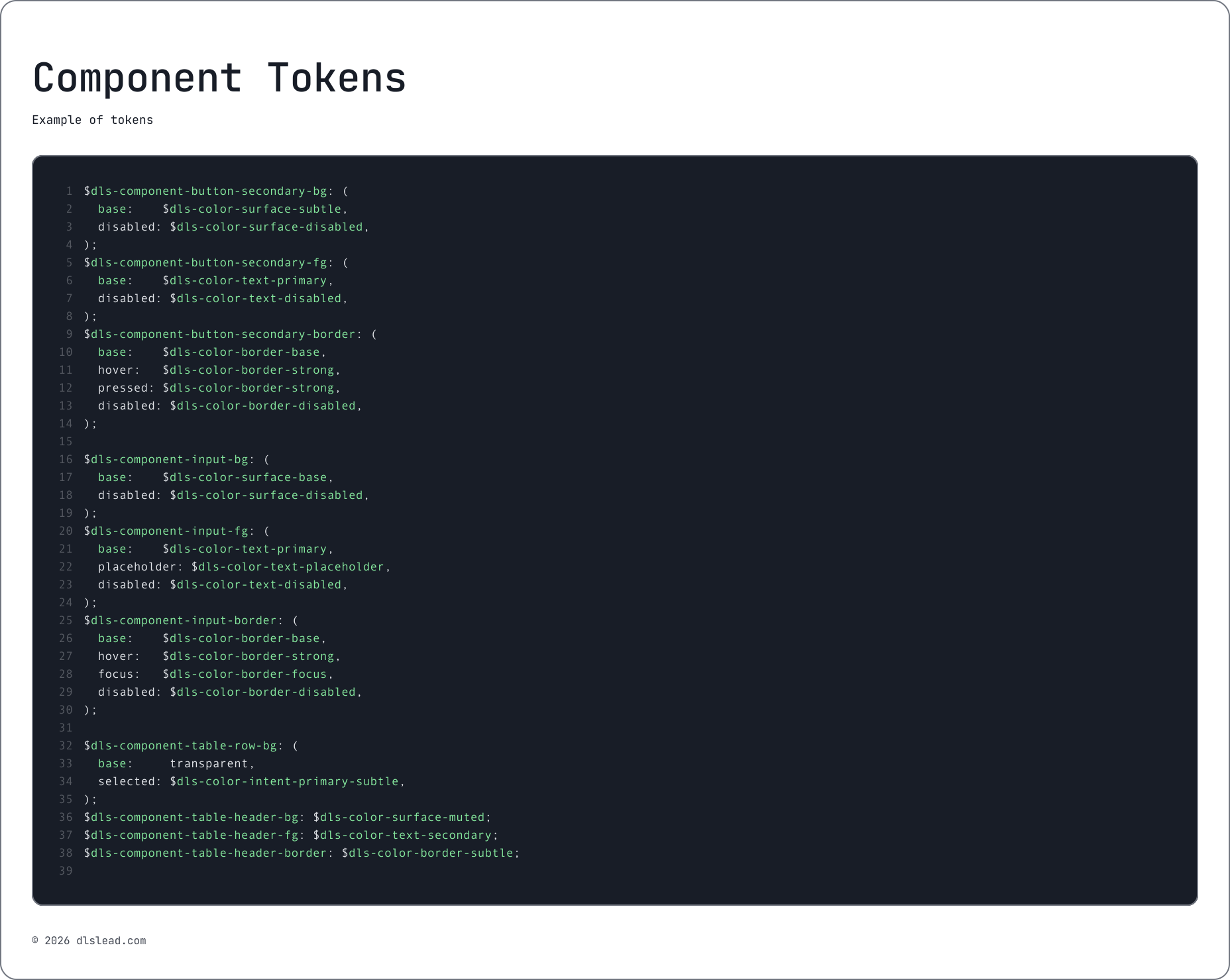
component tokens.scss example
Layer 4:

Component

→ Predictable overrides and scalable components

Component-level tokens define things like button padding, border radius, or background.Adjust one component safely without affecting anything else.

RESULT

A design system that scales safely, whether your team has 3 people or 30, and whether they're building in Figma, React, or with AI coding agents.

How DLS-Lead compares to alternatives

Unlike UI kits built for prototypes and marketing sites, and enterprise UI libraries designed for massive applications, DLS-Lead is built specifically for SaaS dashboards and product interfaces. And it's the only option structured for AI coding workflows.

Feature
UI Kit
Enterprise UI
DLS-Lead
Token architecture
Flat tokens
Minimal tokens
4-layer architecture
Design ↔ Code sync
Partial
Code-first
Figma + React + Storybook
Token standard
Custom
No
DTCG compliant
Documentation
Minimal
Component docs
Architecture + tokens + components
State abstraction
Component-level
Component-level
Centralized state tokens
Color system
HEX palette
Tailwind palette
OKLCH-ready structured scales
Component token layer
No
No
Yes
AI-agent readability
No
No
Structured specs + MCP-ready
Theming safety
Manual overrides
Partial variable support
Cascading token references
UI Kit
Token architecture
Flat tokens
Design ↔ Code sync
Partial
Token standard
Custom
Documentation
Minimal
State abstraction
Component-level
Color system
HEX palette
Component token layer
No
Enterprise UI
Token architecture
Minimal tokens
Design ↔ Code sync
Code-first
Token standard
No
Documentation
Component docs
State abstraction
Component-level
Color system
Tailwind palette
Component token layer
No
DLS-Lead
Token architecture
4-layer architecture
Design ↔ Code sync
Figma + React + Storybook
Token standard
DTCG compliant
Documentation
Architecture + tokens + components
State abstraction
Centralized state tokens
Color system
OKLCH-ready structured scales
Component token layer
Yes

Start free. Go pro when you're ready

Want to see DLS-Lead in action? Start with the Community kit. Evaluate the architecture, test the token cascade, see how components connect. Upgrade when you need the full library.

Community

What's included:

✔ All 4 layers, all color primitives, typography, spacing, shadows

✔ 10 core Figma components, including Alert, Alert Dialog, Avatar, Badge, Button, Checkbox, Input-Fields, Kbd, Radiobutton, Switcher

✔ Light & Dark theme

✔ 10 matching React components in Storybook

✔ Full documentation site access

✔ GitHub token package (npm installable)

✔ AI-agent spec files for the included components

Best for: Evaluating the system and building the essentials
Pro

What's included:

✔ Everything in Community

✔ All 100+ Figma components with full variant sets

✔ All 100+ React components in Storybook

✔ Layout primitives: Sidebar, Top Bar, page shells

✔ 5 starter templates: Dashboard, Settings, Auth, Profile, Empty States

✔ Dark mode — all components and tokens

✔ All interactive states: hover, active, disabled, focus

✔ Complete AI-agent spec files + prompt library for Claude Code and Cursor

✔ MCP server configuration for AI coding workflows

✔ 12 months of updates & new components

✔ Priority support via email

Best for: Professional product work and AI-assisted development

Connected ecosystem

Every piece references the same token architecture, so design, code, documentation, and AI agents stay aligned.

⇒ Figma UI Kit

100+ components with auto-layout, variants, component properties, and full state coverage.

⇒ Documentation site

Token references across all 4 layers, component API docs, usage guidelines, color system overview.

⇒ Storybook

Interactive React component playground. Test every prop, every state, every theme. Hosted on Vercel.

⇒ Github

Full source code. React components, token JSON files, Storybook config, AI-agent spec files. Clone it, npm install, start building.

⇒ Blog

Deep dives on token architecture, AI-ready design systems, and the decisions behind DLS-Lead.

Start with Free Community Kit

See how the tokens cascade, how the components connect, how the system thinks. Test it with your AI coding tools. Upgrade to Pro when you're ready for the full library.

Need a custom design system?

Done-with-you design system sprints, starting at $3K.

DLS-Lead the kit gives you a ready-made foundation. But if your team needs a custom design system tailored to your product, your tech stack, and your AI workflow, I can build that too.

FAQs

What is DLS-Lead?

plus-open-accordeon-iconminus-open-accordeon-icon

DLS-Lead is a design system infrastructure built for SaaS teams. It includes 100+ production-grade components in Figma and React, connected by a 4-layer DTCG-compliant token architecture (Primitives → Semantics → State → Component). 

Unlike UI kits, DLS-Lead provides full token architecture, code sync via Storybook, comprehensive documentation, and AI-agent-readable specifications. It's designed for dashboards, admin panels, and complex product interfaces (not marketing sites).

What makes DLS-Lead different from Material UI, Ant Design, or Chakra UI?

plus-open-accordeon-iconminus-open-accordeon-icon

Material UI, Ant Design, and Chakra UI are component libraries. They provide pre-built UI components with their own design language. DLS-Lead is system infrastructure. It provides a neutral design language with a 4-layer cascading token architecture that you customize to your brand. 

The key differences: DLS-Lead uses DTCG-compliant tokens (the emerging industry standard), offers centralized state tokens (instead of component-level state definitions), and provides structured specifications that AI coding agents can consume directly. 

You change the primitives (colors, spacing, typography) and every component updates automatically. Your product looks like yours, not like DLS-Lead.

What does "AI-ready" mean for a design system?

plus-open-accordeon-iconminus-open-accordeon-icon

AI-ready means the design system's tokens, component definitions, and usage guidelines are structured in a format that AI coding agents (Claude Code, Cursor, v0, and similar tools) can read and reference during code generation. 

Without structured tokens, AI agents fabricate values. They hallucinate colors, spacing, and component states that look plausible but don't match your system. 

DLS-Lead's DTCG-compliant token JSON and component spec files give AI agents a closed set of values to choose from. The AI looks up the correct token instead of guessing.

What is a 4-layer token architecture?

plus-open-accordeon-iconminus-open-accordeon-icon

DLS-Lead organizes design tokens in four cascading layers. 

  • Layer 1 (Primitives) holds raw values: colors, spacing, typography scales. 
  • Layer 2 (Semantics) maps meaning to primitives: background.surface, text.primary
  • Layer 3 (State) defines interaction states centrally: hover, active, disabled, focus. 
  • Layer 4 (Component) sets component-specific values: button padding, input border radius.

Each layer references the one below it, so changes cascade automatically. Update a primitive color, and it flows through semantics, state, and component layers without manual intervention.

What does DTCG-compliant mean?

plus-open-accordeon-iconminus-open-accordeon-icon

DTCG stands for the Design Tokens Community Group, a W3C community group working on a standard format for design tokens. DTCG-compliant tokens use a standardized JSON format ($value, $type) that can be read by any tool that supports the specification, including Figma, Style Dictionary, and AI coding agents. This means DLS-Lead's tokens are portable: they work in your current tools and any future tools that adopt the standard.

Is DLS-Lead right for my project?

plus-open-accordeon-iconminus-open-accordeon-icon

DLS-Lead is designed for SaaS teams building dashboards, admin panels, settings pages, and complex application interfaces. It works best for teams that use React and Figma, need tokens for consistency, and want a foundation they can customize rather than building from scratch. 

It's not designed for marketing sites, landing pages, or mobile-only applications. If you're unsure, start with the free Community kit (it includes 10 core components and the full token architecture, so you can evaluate the system before purchasing).

Can I customize DLS-Lead to match my brand?

plus-open-accordeon-iconminus-open-accordeon-icon

Yes. The 4-layer architecture is designed for exactly this. Swap the primitive layer — your brand colors, typography, spacing scale — and every component updates automatically through the cascading token references. The semantic, state, and component layers provide the structural consistency while the primitives define the visual identity.

How does DLS-Lead work with AI coding tools?

plus-open-accordeon-iconminus-open-accordeon-icon

DLS-Lead includes structured spec files and DTCG-compliant token JSON that AI coding agents can read at the start of a coding session. 

The Pro kit includes a prompt library for Claude Code and Cursor, plus MCP (Model Context Protocol) server configuration. When your AI agent generates a component, it references DLS-Lead's token system instead of fabricating values so the output matches your design system automatically.

What's the difference between the Free and Pro kit?

plus-open-accordeon-iconminus-open-accordeon-icon

The free Community kit includes 10 core components, the full 4-layer token architecture, light and dark themes, matching React components in Storybook, and GitHub token package. It's enough to evaluate the system and build essentials. 

The Pro kit ($79) adds all 100+ components, layout primitives (Sidebar, Top Bar, page shells), 5 starter templates, all interactive states, AI-agent spec files and prompt library, MCP configuration, 12 months of updates, and priority support.

Do you offer custom design system services?

plus-open-accordeon-iconminus-open-accordeon-icon

Yes. If your product needs a custom design system tailored to your specific components, tech stack, and workflows, I offer done-with-you Design System Sprints starting at $3K. 

It's a 4-week collaboration: audit, build, and handoff. 

Other services include off-the-shelf design system customization ($1.5K+), design system audits, and consulting ($150/hr). 

Book a free 30-minute call to discuss your situation.