In Out of the Crisis, W. Edwards Deming estimated that 94% of an organization's success comes from its systems, not from individual behavior.
That number stuck with me when I started auditing why AI-generated UI looks the way it does — inconsistent, off-brand, full of hardcoded values, ignoring the design system that's right there in the codebase.
The problem is the system itself. LLMs can't use a design system properly when vibe coding. They fabricate token names, drift on values, lose all context between sessions and never notice when the upstream library ships breaking changes. Then teams blame the prompt.
This article is what I learned building DLS Lead to fix that. The structure underneath is what determines whether an AI tool produces system-consistent UI or generic AI slop with your colors.
Why most design systems aren't AI-ready
Designers and developers bring context to a design system. When they see a Button labelled primary, they know it's for the main action. When they see a Drawer instead of a Popup in the library, they know it's because the team prefers preserving context. None of that is written down anywhere — it lives in the team's shared memory.
LLMs don't have that memory. They read whatever is in front of them in this specific session. Four failure modes show up:
- Token fabrication. The model invents
--color-primary-500when your system uses--dls-color-action-bg-primary. The names sound plausible but don't exist. - Within-session drift. Same component, three uses, three slightly different paddings. The model loses the value it used two messages ago.
- Between-session amnesia. Whatever the model figured out yesterday is gone. Tomorrow it'll fabricate different tokens for the same components.
- Silent breaking changes. You ship v2 of Button with a renamed prop. The model keeps using v1 because nothing told it not to.
The shift: from documentation to contract
The mental shift that changed how I build is treating the design system as an API, not a library.
A library is something you read about. An API is something you query. A library tolerates ambiguity ("see the Figma file for examples"); an API doesn't ("here are the props, here are the types, here are the constraints").
In software, this is called a component contract — a formal, machine-readable agreement between a component and its consumers (humans, code, AI). The contract promises exactly what the component does, AND demands exactly what consumers must do to use it correctly. Crucially, it's enforceable: CI fails if either side breaks the agreement.
The rest of this article is how to build that contract across four layers: tokens, components, Figma, and drift detection.
Layer 1: Tokenise the foundation with semantic intent
Tokens foundation has to be established before anything else: it should be cascade-aware and named for meaning, not appearance.
If you skip this, nothing further works. The LLM has no anchor — it will either fabricate or hardcode. Both produce drift.
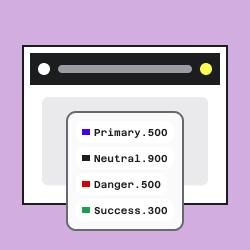
My token system in DLS Lead has four layers:
- Primitives — raw values.
blue/500,gray/100,8px,16px. - Semantics — purpose-named tokens that reference primitives.
--dls-color-action-bg-primary,--dls-color-surface-default,--dls-space-component-md. An AI reading the name knows the intent. - Component tokens — per-component tokens that reference semantics.
--dls-color-component-button-bg-primary-default. Isolates each component so a future semantic change doesn't propagate unpredictably. - State tokens — generated mathematically via Oklch colour shifts from the component tokens.
bg-primary-hover,bg-primary-pressed,bg-primary-disabled. No designer hand-picks these; the math derives them. (I wrote about the Oklch state approach separately here)
Why naming matters: instead of the LLM deciding "what blue should this link be?", it reads a spec file and finds var(--dls-color-action-link-default). The name indicates its purpose, and ai tools interpret it exactly as you.
Good token names carry intent and reference position:
--dls-color-feedback-error-bg-subtle— the role (feedback-error), the property (bg), the variant (subtle).--dls-space-component-card-padding-md— the scope (component-card), the property (padding), the size (md).
Anti-examples:
--blue-500— a primitive leaked into the semantic layer. Tells the model nothing about when to use it.--color-1— opaque. The model will guess what it's for, and guess wrong half the time.--card-bg— collides across components. Multiple cards, multiple meanings, one name.
The third tier — component tokens — is the one skipped most often. It's worth the effort. When component tokens reference semantics rather than primitives directly, you can refactor the semantic layer without breaking components, and you can override one component's colour without affecting others. It also gives the LLM a clean lookup path: it sees Button, queries Button's tokens, gets a complete contract for that component without traversing the whole system.
A practical note on workflow: I built the token system in Figma first, then asked Claude to scaffold the React components one by one. During each component build, the AI generated the component-level (third-tier) tokens. That order matters. If you ask the AI to build components before the foundation is tokenised, it will hardcode or fabricate, and you'll spend the next month untangling it.
Layer 2: Treat every component as an API
Once tokens are in place, the components themselves need to be queryable. Markdown wikis and Figma comments aren't enough. You need machine-readable contracts that an AI can parse at session start.
Concretely, every component in DLS Lead has three artefacts:
A JSON manifest
Generated from the TSX + stories + tokens. One file per component: accordion.json, button.json, dialog.json. Each manifest declares:
- Component name, version, status (stable / beta / deprecated)
- Description and purpose
- Props with types, defaults, required/optional
- Variants (with stories as evidence they exist)
- Component-level tokens used
- Composition rules:
allowedChildren,forbiddenChildren,forbiddenParents,maxDepth - Related components ("see also")
The manifests validate against a single component.v1.json schema. The schema is the actual contract; the manifests are instances of it.
Composition rules are very important. "A Card can contain a CardHeader, CardContent, and CardFooter, but not another Card" is a one-line declaration in the manifest and a paragraph (that the LLM may or may not parse correctly) in markdown. Declared meaning is cheap and correct, inferred - expensive and unreliable.
A spec file with rationale
In specs/components/, every component has a markdown spec with a consistent structure:
- Metadata
- Overview
- Anatomy
- Tokens used
- Props / API
- States
- Code examples
- Why this component / Trade-offs / Alternatives
- Cross-references (Uses / Used by)
When AI suggests a Toast for a form validation error, you want it to know your system uses Inline alert there because the user needs to act on the error before continuing. Without the rationale documented, the model guesses badly at intent.
Document like this:
Toast Purpose: Transient, non-blocking feedback for actions that succeeded or completed without requiring a user response. "Settings saved", "3 items archived", "Link copied".
Why this approach: We evaluated Toast, Inline alert, and Banner for the same problem space. Toast is the default for confirmation because it doesn't block the next action and dismisses on its own. Inline alert stays for context-bound errors that need to persist (form validation, payment failures) — the user has to act before the message goes away. Banner is reserved for system-wide announcements that outlast the current task (maintenance windows, plan limits).
Trade-offs: Easy to miss if the user isn't looking at the corner where it appears. Not suitable for destructive actions or anything the user must acknowledge. We cap visible toasts at two; the rest queue.
Alternatives: Inline alert for errors that require user action and must persist. Dialog for destructive confirmation. Banner for cross-task system messages.
The model now knows not just what Toast does, but when to choose it over its alternatives — which is the decision AI tools get wrong most often. That's the difference between a manual and a contract.
Build script + CI validation
The manifests should always stay in sync with the codebase. An AI tool automatically generates the JSON manifest from Storybook component docs, tokens.json, and linked Figma component data. The manifest reflects the real component structure and design in Figma. CI fails if the schema is invalid or if Storybook properties are missing from the manifest.
Layer 3: Make Figma readable to machines
The code side is half the system and the Figma is the other half, they should be treated slightly differently.
A Figma component that an AI agent can actually use needs five things:
1. A description field that reads like an API doc. Not a sentence. A structured contract: what the component is, what each variant means, what each slot accepts, what the constraints are. A multimodal model can look at a frame, but that's still reconstruction from pixels. Declared meaning lives in the description (Component Configuration) field. Use it.
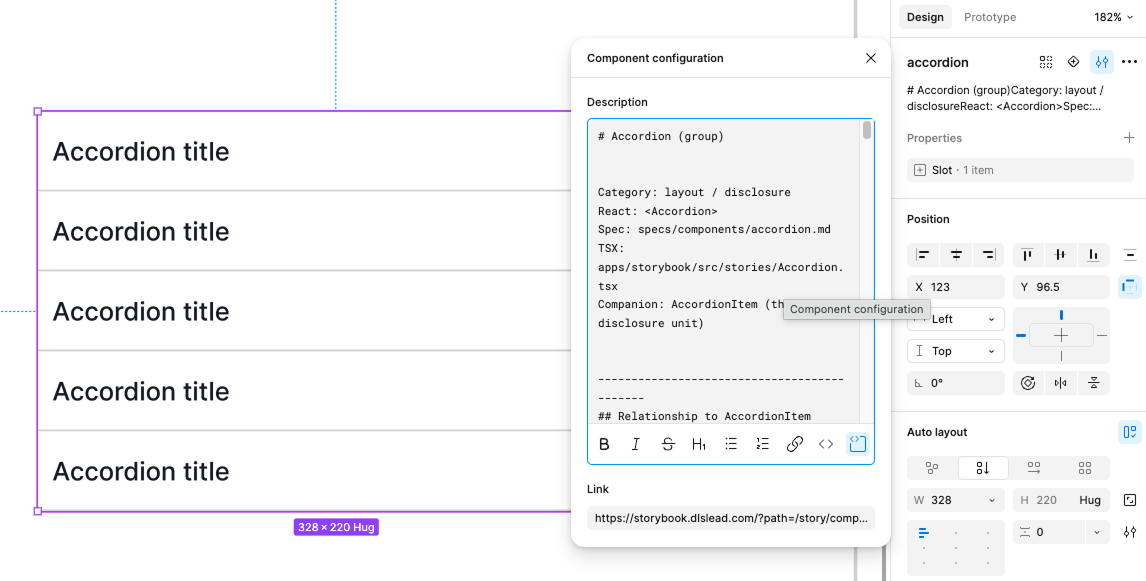
The difference between Figma description and component specification docs:

2. A documentation link. Point to the canonical spec — Storybook URL or a permalink to specs/components/{name}.md. When the AI agent needs more context than the description carries, it follows the link.
3. A Figma → Code mapping table in the component description. Figma properties don't need to match React prop names, and forcing them to is a bad trade — designers use the library, not the machine. "Slot (1 item)" reads better to a designer working in Figma than children. What the AI needs isn't naming parity; it needs the mapping declared, not inferred. Put it in the description as a small table:
## Figma → Code mapping
| Figma property | React prop | Values     |
|----------------|------------|------------|
| Slot (1 item)  | children   | ReactNode  |
| State          | —          | (Figma-only) |
| Active         | defaultOpen | On / Off   |
4. Figma variable names that match CSS token names exactly. Figma variable color/component/accordion/item/bg-hover ↔ CSS --dls-color-component-accordion-item-bg-hover. Same discipline as props. Same payoff.
5. Annotations on slots and properties. Figma annotations are extracted by the Figma MCP and become part of the design context output. It is not necessary to write annotation for every component, but if they make sense for designers who work with the system, they will also make sense for AI tools.
There's also a small but important convention worth adding: prefix work-in-progress and reference frames with _dev/, _wip/, or _internal/.
Every Figma file collects clutter over time — variants a designer is testing, old versions kept for reference, exploration frames, etc. A human browsing the file knows to skip them. The Figma MCP doesn't. It returns every frame it finds, and the AI agent has no way to tell which Button is the real one and which is last month's abandoned experiment.
The prefix is the Figma equivalent of .gitignore. Tell the MCP (or your project rules) to skip anything starting with _. One character of cost; it prevents an agent from generating production code against someone's draft.
Layer 4: Catch drift before it ships
Tokens, components, and Figma can be perfectly built on Monday and broken by Friday. Drift is the default state of any system in motion. The contract has to be defended automatically.
Four pieces handle that in DLS Lead:
llms.txt at repo root. Following the MurphyTrueman AI-readiness checklist and proposed by Jeremy Howard - plain-markdown index telling AI agents where to find component docs, token definitions, architecture decisions, and prompt libraries. Trivial to create, big win for inference-time context retrieval.
Token audit script in CI. Catches hardcoded values in component code — every #3B82F6 or padding: 16px that should have been a token reference. If the audit fails, the PR doesn't merge.
Figma sync audit, extended to components. My existing script audits tokens (Figma variable names must match CSS token names). The extended version audits components: for every component in specs/components/, verify a matching Figma component exists with matching variants and properties. This is the drift detector that catches "designer renamed the variant but didn't tell the dev."
Component usage tracker. A weekly script that scans the consuming apps and emits usage-report.json: which components are used where, which versions, how many instances of any deprecated component still exist. When a component API changes, this tells you (and the AI) exactly what needs updating.
When deprecations do happen, the manifest gets a deprecated block — since, replacement, and a codemod reference. The AI sees the deprecation in the manifest, finds the replacement, and applies the codemod where it can.
What this actually gets you
AI-ready-design-system needs structural work.
Once it's in place:
- An AI tool that opens your repo at session start reads
llms.txt, follows it to the manifests and specs, and queries the contract. - Tokens get used correctly because their names declare intent.
- Components get used correctly because their manifests declare composition rules.
- Figma context and code context agree because their vocabularies are identical.
- Breaking changes get caught before they ship because the schema rejects them.
The frame I keep coming back to is that prompts are instructions, design systems are memory. A prompt is what you ask in this session. The design system is what the AI remembers across sessions, across teammates, across versions. If the memory isn't structured for retrieval, no prompt is going to save you.
Build the memory first. The 94% Deming was talking about lives there.